You can take photos on a run without taking off your armband: pause somewhere safe, twist your phone off the LULURUN armband's detachable mount, take your photo, then lock it back in. The band stays on your arm the whole time, so there's no unstrapping and no re-fitting before you set off again.
That's the short version. Below is a simple, happy routine for photo stops, plus a quick check to do before you start moving again.
Why stop for a photo at all?
Because the view is part of the run. Maybe it's the sea glittering at the end of your loop, a row of autumn trees, or your running buddy grinning after a first 5K. Joy over pace means those little moments count just as much as the distance on your app.

The usual friction is the phone itself. If it lives in a pocket or a fully strapped-in armband, getting it out can feel like a whole production, so many of us just skip the photo and keep going. A two-part armband changes that: the phone comes off, and the band stays put.
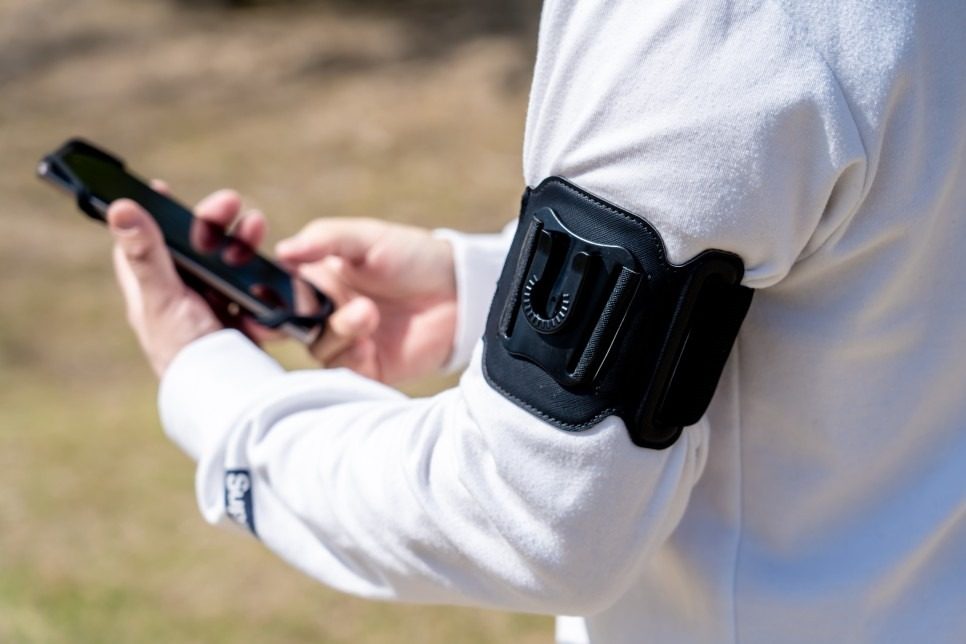
What makes this easy on the LULURUN armband?
The LULURUN armband is built from parts that each have one job:
- An open silicone holder that grips your phone at its corners, with no pouch over the screen.
- A detachable mount that connects the holder to the band and locks with a 90° twist. This is the part you use for photo stops.
- The band itself, which stays on your upper arm while your phone is in your hand.
The mount also rotates a full 360°, so you can adjust how your phone sits. That's a separate feature from the twist lock. For a photo stop, the twist lock is the one that matters. If you'd like the full picture of how it works, our guide to quick-release running armbands and the twist-lock mount walks through it.
Step by step: a photo stop that keeps the band on
- Choose your spot. Step fully off the path, out of the way of other runners, walkers and cyclists, before you stop. A bench, a wide patch of grass or a viewpoint railing all work nicely. Our post on sharing paths with cyclists has a few more friendly habits.
- Come to a full stop. Pause somewhere safe before detaching your phone. A photo stop is a stop-and-go moment, not a mid-stride trick.
- Twist the phone off. Use the 90° twist-lock mount to take your phone off. The band stays on your arm.
- Take your photo. Frame the view, take a breath, enjoy the moment. Holding the phone in your hand may feel easier for framing a view than looking down at your arm.
- Lock it back in. Reattach the phone and check that the mount is locked in place before you move again.
- Test with a few easy steps. Walk or jog briefly to check the fit, and adjust before picking up the pace.
A quick check before you run again
Before you head off, take a moment for this little routine:
- Corners: Check that each corner of your phone is held securely in the silicone holder.
- Mount: Check that the detachable mount is locked in place.
- Fit: Walk or jog briefly, and adjust before picking up the pace.
- Band: If the band slips, pause and reposition it rather than over-tightening. Our guide to how tight a running armband should be covers finding a comfortable snug fit.

A few things to keep in mind
Photo stops are best on bright, easy days. The armband is sweat resistant, not waterproof, and the open holder does not shield your phone from water, so if the weather turns, tuck your phone away the way you normally would.
If you're still choosing an armband, check your phone and case first. The stated phone range is 5.0–6.9 inches with slim or clear cases; thick, rugged and MagSafe wallet cases are not compatible. The product page lists the full fit details.
And if you've ever wondered whether it's simpler to just carry your phone in your hand the whole way, our post on running while holding your phone talks through that choice.
FAQ
Do I need to take the whole armband off to use my phone's camera? No. On the LULURUN armband, the phone holder is attached through a detachable mount with a 90° twist lock, so your phone can come off while the band stays on your upper arm.
Is the 360° rotation the same as the twist lock? No. The 90° twist lock is how the holder attaches to and detaches from the band. The 360° rotation lets you adjust how your phone sits while it's attached.
Can I detach my phone while I'm still running? Please don't. Pause somewhere safe before detaching your phone, then check the mount is locked in place before you start moving again.
Run happy, run free.